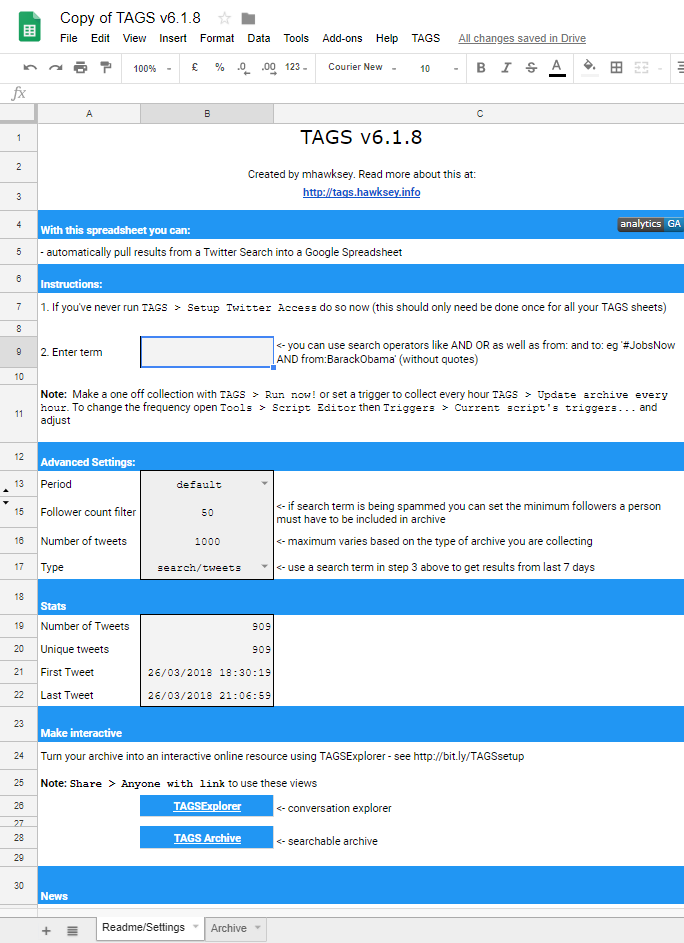
In Social Media Scraping and Network Analysis, researchers use a software that will scrape the data of their choosing and go into that network and gather the information. For this project, I used a software called TAGS, which was created as a “hobby” project by Martin Hawksey, that allows you to scrape users tweets from Twitter. TAGS runs through a Google Sheets program that you can download directly from the website for free. The software allows you to save it directly to your own Google Drive. Once the template has been downloaded, it is required to link your Twitter account to TAGS so it has a way to access Twitter and the tweets you wish to obtain. Once you do that you are able to run multiple archives within this software. The spreadsheet allows you to narrow your search down to specific terms whether you are looking for a certain word, phrase or hashtag. It also can search for multiple terms using search operators like AND or OR. TAGS is very thorough as you are able to filter your search by selecting exactly how many tweets you want the software to gather, the time you want the data to be scraped from and you can even choose the minimum amount of followers for users that you want to get this data from. For example, if you were to type in next to “Follow count filter”, the number 50, that means that the system will not pull any tweets from users with less than 50 followers. I believe that this is included in the search so you have the option to eliminate the majority of Twitterbots that are on the social media network. Once you have set your terms and filters, you can then run the software and it will gather your archive within minutes for the timeline that you chose. For my archive, I used the terms Grayson AND Duke, set my maximum number of tweets to 1,000, and had a follow count filter of 50. My data was formed from a 3 hour period of 6:30 P.M to 9:30 P.M on March 26, 2018. If you are interested in a full tutorial of how TAGS is ran please following the link given.
Another software tool for social media scraping that is commonly used if TAGS is not for you is NodeXL. NodeXL is ran through an open-source template using Microsoft Excel. NodeXL basic is a free download that enables the user to enter a network edge list in a Microsoft Excel worksheet that will show you a graph of that archive. NodeXL Pro has to be purchased, but it offers easy access to social media network metrics, text and sentiment analysis and powerful report generation. For a complete tutorial of NodeXL basic click on the link provided.